Stack 위젯은 Flutter에서 여러 자식 위젯을 겹치게 배치할 수 있게 해주는 컨테이너 위젯입니다 Stack 내의 모든 자식은 오버레이 구조로 배열되어, 리스트의 앞쪽에 있는 위젯이 아래쪽에 위치하게 됩니다. Stack 위젯은 주로 위젯들 간의 위치를 상대적으로 정의할 때 사용됩니다.
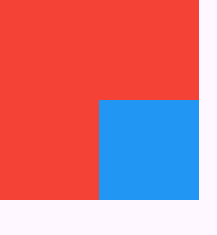
Stack 위젯과 alignment 속성의 사용
import 'package:flutter/material.dart';

void main() {
  runApp(const MyApp());
}

class MyApp extends StatelessWidget {
  const MyApp({super.key});

  @override
  Widget build(BuildContext context) {
    return MaterialApp(
      home: SafeArea(
        child: Scaffold(
          body: Stack(
            alignment: Alignment.bottomRight,
            children: [
              Container(
                width: 200,
                height: 200,
                color: Colors.red,
              ),
              Container(
                width: 100,
                height: 100,
                color: Colors.blue,
              ),
            ],
          ),
        ),
      ),
    );
  }
}
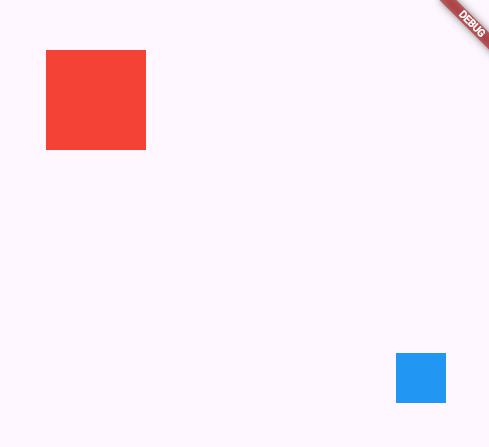
Stack 위젯과 Positioned 위젯의 사용
import 'package:flutter/material.dart';

void main() {
  runApp(const MyApp());
}

class MyApp extends StatelessWidget {
  const MyApp({super.key});

  @override
  Widget build(BuildContext context) {
    return MaterialApp(
      home: SafeArea(
        child: Scaffold(
          body: Stack(
            // alignment: Alignment.bottomRight,
            // Stack 위젯안에 Positioned 위젯을 사용할 수 있다.
            children: [
              Positioned(
                top: 50,
                left: 50,
                child: Container(
                  width: 100,
                  height: 100,
                  color: Colors.red,
                ),
              ),
              Positioned(
                bottom: 50,
                right: 50,
                child: Container(
                  width: 50,
                  height: 50,
                  color: Colors.blue,
                ),
              ),
            ],
          ),
        ),
      ),
    );
  }
}

import 'package:flutter/material.dart';

void main() {
  runApp(const MyApp());
}

class MyApp extends StatelessWidget {
  const MyApp({super.key});

  // This widget is the root of your application.
  @override
  Widget build(BuildContext context) {
    return MaterialApp(
      home: SafeArea(
          child: Scaffold(
        body: Center(
          child: Stack(
            alignment: Alignment.topLeft,
            children: [
              Container(
                width: 300,
                height: 300,
                color: Colors.blue,
              ),
              Container(
                width: 200,
                height: 200,
                color: Colors.red,
              ),
              Container(
                width: 100,
                height: 100,
                color: Colors.orange,
              ),
              Container(
                width: 50,
                height: 50,
                color: Colors.green,
              ),
            ],
          ),
        ),
      )),
    );
  }
}

import 'package:flutter/material.dart';

void main() {
  runApp(const MyApp());
}

class MyApp extends StatelessWidget {
  const MyApp({super.key});

  // This widget is the root of your application.
  @override
  Widget build(BuildContext context) {
    return MaterialApp(
      home: SafeArea(
          child: Scaffold(
        body: Center(
          child: Stack(
            alignment: Alignment.center,
            children: [
              Container(
                width: 300,
                height: 300,
                color: Colors.blue,
              ),
              Container(
                width: 200,
                height: 200,
                color: Colors.red,
              ),
              Container(
                width: 100,
                height: 100,
                color: Colors.orange,
              ),
              Container(
                width: 50,
                height: 50,
                color: Colors.green,
              ),
            ],
          ),
        ),
      )),
    );
  }
}

import 'package:flutter/material.dart';

void main() {
  runApp(const MyApp());
}

class MyApp extends StatelessWidget {
  const MyApp({super.key});

  // This widget is the root of your application.
  @override
  Widget build(BuildContext context) {
    return MaterialApp(
      home: SafeArea(
          child: Scaffold(
        body: Center(
          child: Stack(
            alignment: Alignment.center,
            children: [
              Container(
                width: 300,
                height: 300,
                decoration: BoxDecoration(
                    shape: BoxShape.circle,
                    color: Colors.white,
                    border: Border.all(width: 2, color: Colors.blue)),
              ),
              Container(
                child: Text(
                  "2 : 55 : 10",
                  style: TextStyle(fontSize: 40, fontWeight: FontWeight.w700),
                ),
              ),
            ],
          ),
        ),
      )),
    );
  }
}
'Flutter' 카테고리의 다른 글
| [FLUTTER] 상태관리 응용 앱 제작 1 - StatefulWidget (2) | 2025.01.20 |
|---|---|
| [FLUTTER] 콜백 함수(Callback Function) (0) | 2025.01.20 |
| [FLUTTER] 기초 화면 구성 (0) | 2025.01.20 |
| [FLUTTER] 위젯(Widget) (0) | 2025.01.20 |
| [FLUTTER] 플러터의 UI (0) | 2025.01.20 |